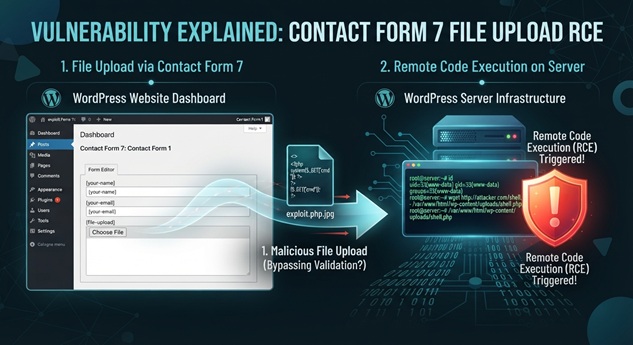
A critical unauthenticated file upload vulnerability has been disclosed in Contact Form 7, one of the most widely used WordPress plugins with more than 10 million active installations. Tracked as CVE-2026-114432 and scored CVSS 3.1 9.8 Critical by CISA’s Vulnrichment program, the flaw lets any visitor upload arbitrary files that can lead to remote code execution on affected sites.
What Happened: Contact Form 7 File Upload Bypass Enables Unauthenticated RCE
On November 8, 2026, WPScan published CVE-2026-114432 after researcher Shinya Murakami reported an unrestricted file upload weakness in Contact Form 7 versions 6.2 through 6.2.3. The plugin, which powers contact forms on millions of WordPress sites, failed to validate uploaded file types before accepting them through its file upload field.
Furthermore, a separate cleanup flaw leaves uploaded files on disk rather than removing them after the form submission completes. Consequently, an attacker can upload malicious files and then access them directly, bypassing normal security controls. On stock Debian or Ubuntu Apache configurations, where directory listing is enabled and the .phar extension maps to the PHP handler, the uploaded file can execute as PHP and grant full remote code execution.
Technical Details of the CVE-2026-114432 Vulnerability
The vulnerability stems from two combined weaknesses in Contact Form 7’s file handling logic. First, the plugin does not check the type or extension of uploaded files before accepting them through a form’s file field (CWE-434: unrestricted upload of file with dangerous type). Second, the temporary-file cleanup mechanism fails to remove the uploaded file from the server’s disk after processing.
Attack requirements:
- A Contact Form 7 form with a file upload field enabled
- No authentication required — any visitor can submit the form
- The uploaded file persists in the uploads directory due to the cleanup failure
Execution path on vulnerable Apache configurations:
- Attacker submits a form with a malicious .phar file
- Contact Form 7 accepts and stores the file without validation
- The cleanup routine fails to delete the temporary file
- Attacker locates the stored file via directory listing
- The server executes the file as PHP, granting remote code execution
On nginx and Apache configurations with .htaccess overrides enabled, the impact is limited to arbitrary file writes into the uploads directory. However, the uploaded file may still be served as active content such as HTML or SVG from the site’s own origin, enabling cross-site scripting or other attacks.
Business and Operational Impact
With over 10 million active installations, Contact Form 7 is among the most popular WordPress plugins in existence. The vulnerability’s reach is therefore substantial. Affected sites face several serious risks:
- Remote code execution: Full server compromise on default Apache configurations
- Website defacement: Attackers can modify site content and inject malicious scripts
- Data theft: Access to WordPress databases, user information, and site configurations
- Malware distribution: Compromised sites can serve malware to visitors
- SEO poisoning: Injected content can damage search rankings and redirect traffic
- Supply chain risk: Compromised sites may host phishing pages or further exploit kits
Organizations running Contact Form 7 on shared hosting or managed WordPress platforms should be particularly vigilant. The unauthenticated nature of the flaw means automated scanners and exploit tools can target large numbers of sites rapidly.
Mitigation and Recommendations
Immediate Actions for Defenders
- Update immediately: Upgrade Contact Form 7 to version 6.2.4 or later, which fixes both the validation and cleanup flaws
- Audit uploads directories: Review the plugin’s upload folder for unexpected files, especially .phar extensions
- Disable directory listing: Turn off directory listing in Apache configurations for upload directories
- Restrict handler mappings: Remove PHP handler mappings for upload-reachable folders
- Monitor for exploitation: Watch for unusual POST requests to contact form endpoints and unexpected file uploads
Additional Hardening Steps
Beyond patching, site administrators should implement defense-in-depth measures. Disable directory listing across the entire site unless specifically required. Configure web server rules to prevent execution of PHP and other scripts in uploads directories. Enable file upload restrictions at the server level in addition to plugin-level controls.
Bottom line: CVE-2026-114432 is a critical vulnerability in an extremely popular WordPress plugin that can grant unauthenticated remote code execution on default Apache configurations. The maintainers have released version 6.2.4 to address the flaw, and WPScan plans to publish proof-of-concept details on November 19, 2026. Every site running Contact Form 7 6.2 through 6.2.3 should update before that date.
Incident Summary
| CVE ID / Incident: | CVE-2026-114432 |
| Affected Systems: | Contact Form 7 WordPress plugin versions 6.2 through 6.2.3 |
| Disclosure Date: | November 8, 2026 |
| Patch Status: | Fixed in Contact Form 7 6.2.4 |
| CVSS Score: | 9.8 Critical (CVSS 3.1) |
| CISA KEV: | Not yet listed as of November 9, 2026 |
| Exploitation Status: | No confirmed exploitation reported |
References
- CVE Program. “CVE-2026-114432 Record.” November 8, 2026. https://www.cve.org/CVERecord?id=CVE-2026-114432
- National Vulnerability Database. “CVE-2026-114432.” November 8, 2026. https://nvd.nist.gov/vuln/detail/CVE-2026-114432
- WPScan. “Contact Form 7 6.2 – 6.2.3 – Unauthenticated Arbitrary File Upload via Invalid UTF-8 Filename.” WPVDB 6b0a5d1f-84fb-425f-8d37-ddde5703937c. November 5, 2026. https://wpscan.com/vulnerability/6b0a5d1f-84fb-425f-8d37-ddde5703937c/
- WordPress.org Plugin Directory. “Contact Form 7.” https://wordpress.org/plugins/contact-form-7/
- Brandefense. “CVE-2026-114432: Contact Form 7 RCE Flaw.” November 9, 2026. https://brandefense.io/knowledge-hub/vulnerabilities/cve-2026-114432/